

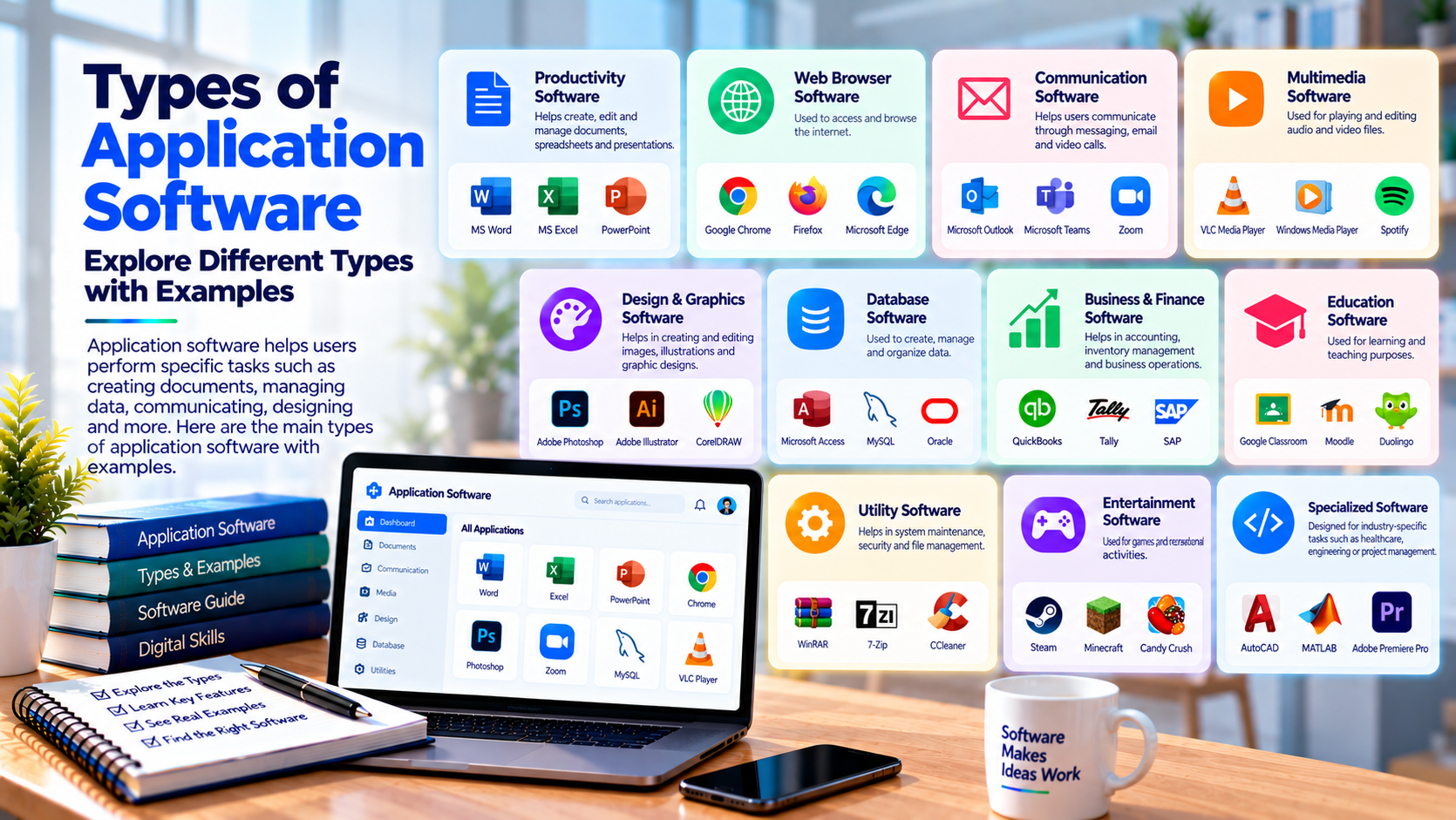
Types of Application Software: A Practical Guide for Modern Businesses

Software is now part of almost every activity we perform online. From sending emails and managing finances to booking healthcare appointments and shopping online, applications help users complete specific tasks through digital platforms. Businesses also depend on software to manage internal operations, communicate with customers, and deliver services.
But application software is not limited to one category. There are many different solutions designed for different users, industries, and business requirements. Understanding the types of application software can help businesses identify the right technology for their needs and understand how different applications fit into their digital operations.
In this newsletter, we’ll look at common application software categories, how they are used, and why businesses may choose custom applications for specialized requirements.
What Is Application Software?
Application software refers to programs designed to help users perform specific tasks. Unlike system software, which manages the basic functions of a computer or device, application software focuses on activities that users need to complete.
A web browser, accounting platform, mobile banking app, healthcare portal, and project management tool are all examples of application software. Each one has a different purpose, but all are designed to provide users with specific functionality.
The types of application software available today have expanded as businesses and consumers have adopted new digital technologies. Applications can now operate through desktop computers, mobile devices, web browsers, cloud environments, and connected systems.
Application Software vs. System Software
The difference becomes easier to understand when we look at their roles. System software provides the foundation required for a computer or device to operate. Operating systems and device drivers are common examples.
Application software operates on top of this foundation. It gives users tools for writing documents, managing customer data, processing payments, communicating with others, or performing industry-specific tasks.
Common Types of Application Software
Application software can be classified in several ways based on its purpose and target users. Some applications are created for general consumers, while others are designed for businesses, professionals, or specific industries.
The types of application software a business chooses will depend on its processes, customers, employees, technical environment, and overall objectives.
Productivity Software
Productivity applications help users complete everyday tasks more efficiently. Word processors, spreadsheet applications, presentation tools, note-taking platforms, and task management systems fall into this category.
Businesses use productivity software to create documents, analyze information, prepare presentations, organize projects, and collaborate with teams. These tools are common across many industries because they support general workplace activities.
Business Management Software
Business applications help organizations manage their daily operations. Customer relationship management systems, accounting platforms, inventory applications, enterprise resource planning software, and human resource management systems are examples.
These applications can centralize business information and provide employees with tools for managing specific workflows. Depending on the organization, a business may use one platform or integrate several applications.
Communication and Collaboration Software
Communication applications allow individuals and teams to exchange information digitally. Email platforms, video conferencing tools, instant messaging applications, and collaboration systems are common examples.
These tools have become particularly important for businesses with distributed teams. They can support meetings, file sharing, project discussions, and day-to-day communication.
Web Applications
Web applications operate through internet browsers and are commonly accessed from computers, tablets, and smartphones. Users generally do not need to install traditional software on every device to access these services.
Online banking platforms, e-commerce stores, customer portals, booking systems, learning platforms, and cloud-based business tools are examples of web applications.
Why Businesses Use Web Applications
Web applications can make services accessible across multiple devices and locations. Updates can also be managed centrally, depending on the application's architecture.
For businesses, web applications can provide a direct way to deliver services to customers or give employees access to internal systems.
Mobile Applications
Mobile applications are designed specifically for smartphones and tablets. They can provide customers with convenient access to services while taking advantage of device capabilities such as notifications, cameras, location services, and biometric authentication.
Retail, healthcare, banking, transportation, education, and entertainment companies all use mobile applications to connect with their users.
Mobile Apps for Customer Services
A mobile application can allow customers to place orders, schedule appointments, check account information, communicate with support teams, or receive notifications.
The appropriate functionality depends on the business model. A healthcare application, for example, may require different workflows from a food delivery or retail application.
Enterprise Application Software
Enterprise applications are designed to support larger organizational processes. They may manage finance, supply chains, customer relationships, human resources, inventory, or other business functions.
These systems can serve many users and may need to connect with multiple internal and external platforms.
Enterprise Integrations
Integration is often an important part of enterprise software. An application may need to exchange information with payment systems, databases, customer platforms, analytics tools, or third-party services.
APIs can help different systems communicate while allowing businesses to maintain separate applications for different functions.
Healthcare Application Software
Healthcare is another major area where application software is used. Hospitals, clinics, pharmacies, healthcare providers, and patients may interact with several digital applications throughout the healthcare journey.
Healthcare software can support appointment scheduling, patient portals, telehealth services, pharmacy management, billing, communication, and administrative workflows.
When evaluating the types of application software used in healthcare, businesses also need to consider security, privacy, user permissions, integrations, and applicable regulatory requirements.
Healthcare Applications and Data Security
Healthcare applications may process sensitive information, making security an important part of the development process. Authentication, authorization, encryption, secure APIs, monitoring, and access controls may be required depending on the application.
The exact requirements vary according to the type of data being handled, location, business model, and applicable rules.
Educational and E-Learning Applications
Educational applications support students, teachers, institutions, and training organizations. Learning management systems, online classrooms, assessment platforms, student portals, and educational mobile applications are common examples.
These platforms can provide access to courses, assignments, assessments, learning materials, communication tools, and progress information.
Supporting Digital Learning
Modern education software can support different learning models, including self-paced courses, instructor-led training, hybrid education, and remote learning.
The application architecture depends on the number of users, course structure, content requirements, integrations, and expected usage.
Custom Application Software
Standard software can be suitable when a business has common requirements. However, some organizations have workflows that cannot be easily supported by existing applications.
Custom application software is developed around the organization's specific requirements. Features, user roles, dashboards, integrations, and workflows can be designed for a particular business model.
Why Businesses Choose Custom Applications
Custom software can be useful when businesses need specialized functionality or want to connect several processes within one platform.
For example, a healthcare organization might need an application combining appointment scheduling, patient communication, billing, and administrative functions.
Cloud-Based Application Software
Cloud-based applications use cloud infrastructure to host software, databases, storage, and related services. Users can often access these applications through browsers or connected devices.
Cloud architecture can provide flexibility when application usage changes over time, although the specific benefits and requirements depend on how the system is designed.
Scalability and Cloud Infrastructure
Businesses should consider expected traffic, storage requirements, security needs, geographic distribution, integrations, and operational costs when planning cloud-based applications.
A well-planned architecture can provide a foundation for future growth while allowing teams to adjust infrastructure according to changing requirements.
How to Choose the Right Application Software
There is no single application type that works for every business. The right solution depends on the organization's goals, users, workflows, budget, technical environment, and future plans.
Before choosing software, businesses should identify the problem they are trying to solve and determine which features are actually required.
Evaluate Features and Integrations
Businesses should review the application's functionality, user experience, security capabilities, integration options, scalability, and support model.
It is also useful to determine whether the software can adapt as business requirements change. A solution that works today may need additional capabilities in the future.
The Role of Application Development Companies
When existing software cannot meet specific requirements, businesses may work with a software development company to create a custom application.
Development teams can support requirements analysis, UI/UX design, architecture planning, frontend and backend development, API integrations, testing, deployment, and maintenance.
Understanding the types of application software before beginning development can help businesses communicate their requirements more clearly and determine which type of solution fits their objectives.
Planning for Long-Term Development
Application development does not end when the software is launched. Businesses may need security updates, performance improvements, new integrations, feature additions, and technical maintenance over time.
A development partner should therefore be evaluated not only for initial development capabilities but also for its ability to support future requirements.
How SynergyTop Supports Custom Software Projects
Businesses planning a custom application may need support across several areas, including software architecture, application development, UI/UX design, APIs, integrations, cloud technologies, testing, and ongoing maintenance.
SynergyTop provides software development services for businesses building custom digital applications and platforms. Organizations looking for technology support can review its software development capabilities through SynergyTop.
Final Thoughts
Understanding the types of application software can help businesses make more informed technology decisions. Productivity tools, web applications, mobile apps, enterprise platforms, healthcare systems, educational software, and cloud applications all serve different purposes.
The right choice depends on what a business wants to accomplish and who will use the software. For common requirements, an existing platform may be sufficient. For specialized workflows, custom application development can provide a solution built around specific business needs.
As digital services continue to grow, application software will remain an important part of how organizations operate and serve their customers. By identifying clear requirements and choosing the right technology approach, businesses can create digital systems that support both current operations and future development.