
What Happens to CCTV Cameras During Internet Failure
In an increasingly connected world, CCTV systems have become a vital part of home and business security. Most modern surveillance solutions rely heavily on internet connectivity for remote access, cloud storage, and real-time alerts. But a common concern among users is: what happens to CCTV cameras when the internet goes down?
Understanding how your system behaves during an outage is essential for maintaining reliable security. This guide explores what continues to work, what stops functioning, and how to prepare your system for uninterrupted protection.
Do CCTV Cameras Stop Working Without the Internet?
The short answer is no—CCTV cameras do not completely stop working during an internet failure. However, their functionality becomes limited depending on the type of system you are using.
Most IP cameras are designed to operate both online and offline. While internet connectivity enhances their capabilities, their core function—recording video—can still continue without it.
The exact behavior depends on whether your system relies on cloud storage, local storage, or a hybrid setup.
What Functions Continue to Work?
Even without internet access, several important features of your CCTV system remain operational.
Local Recording
If your cameras are connected to a DVR (Digital Video Recorder), NVR (Network Video Recorder), or have built-in SD card storage, they will continue recording footage. This is one of the most critical advantages of modern surveillance systems.
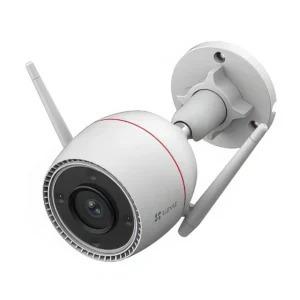
For example, devices like EZVIZ H3c 2K⁺ Wi-Fi are designed to support local storage, ensuring that video footage is even when the internet is unavailable.
Continuous Monitoring (On-Site)
If you are physically present at the location, you can still view live footage through a monitor connected directly to your recording device. This is common in offices, shops, and industrial setups.
Motion Detection (Limited)
Some cameras continue to detect motion and record clips locally. However, without internet connectivity, notifications cannot be sent to your mobile device.
What Stops Working During Internet Failure?
While basic recording continues, several advanced features become unavailable when the internet goes down.
Remote Access
You won’t be able to view live footage or playback recordings from your smartphone or computer remotely. This is one of the biggest limitations during an outage.
Push Notifications and Alerts
Smart alerts that notify you about motion detection, human presence, or unusual activity will not function. Without internet access, the system cannot send updates to your device.
Cloud Storage
Cameras that rely solely on cloud storage will be unable to upload footage during the outage. This could result in temporary gaps in cloud recordings unless local backup is available.
Smart Integrations
Features like voice control, automation, and integration with smart home systems will also stop working temporarily.
Devices categorized under 3K Smart Home Wi-Fi systems often rely on cloud connectivity for advanced automation, which becomes inaccessible during downtime.
Types of CCTV Systems and Their Behavior
Not all CCTV systems respond the same way to internet failures. Understanding the differences can help you choose the right setup.
Wired DVR/NVR Systems
These systems are the most reliable during outages. Since they primarily use local storage and wired connections, they continue recording without interruption.
Wireless IP Cameras
ip-cameras connected via Wi-Fi may lose remote functionality but can still record locally if configured properly.
Cloud-Only Cameras
These cameras depend entirely on internet connectivity. During an outage, they may stop recording altogether unless they have internal storage options.
How to Ensure CCTV Works During Internet Outages
To maintain consistent security, it’s important to prepare your system for potential internet failures.
Use Cameras with Local Storage
Always choose cameras that support SD cards or NVR/DVR recording. This ensures continuous footage even when offline.
Invest in Hybrid Systems
Hybrid systems combine cloud storage with local backup, offering the best of both worlds. Even if one fails, the other continues to function.
Install a Backup Internet Connection
Using a secondary connection, such as a 4G router, can keep your cameras online during primary internet outages.
Use Uninterruptible Power Supply (UPS)
Power outages often accompany internet failures. A UPS ensures that your cameras and recording devices remain operational during such events.
Importance of Proper Configuration
Many users assume their CCTV system is fully secure, only to discover gaps during unexpected outages. Proper configuration plays a crucial role in ensuring reliability.
-
Enable local recording settings
-
Regularly check storage capacity
-
Test your system by temporarily disconnecting the internet
-
Keep firmware updated for optimal performance
Taking these steps ensures your system performs as expected when it matters most.
Common Misconceptions About CCTV and Internet Dependency
“Cameras Are Useless Without Internet”
This is one of the biggest myths. While some features are limited, core recording functions still operate in most systems.
“All Footage Is Lost During Outages”
If your system uses local storage, footage is محفوظ and can be accessed once the connection is restored.
“Wireless Cameras Stop Completely”
Wireless cameras may lose connectivity features, but many continue recording locally depending on their design.
When Internet Connectivity Is Restored
Once your internet connection is back, your CCTV system typically resumes normal operation automatically.
-
Remote access is restored
-
Notifications resume
-
Cloud uploads may sync (depending on the system)
Some cameras may even upload stored footage to the cloud after reconnection, ensuring no data is lost.
Choosing the Right CCTV Camera for Reliability
Selecting the right camera is essential for uninterrupted security. Look for features such as:
-
Dual storage options (cloud + local)
-
Strong offline recording capabilities
-
Reliable mobile app support
-
Efficient compression technology
Models like EZVIZ H3c 2K⁺ Wi-Fi offer a balanced combination of smart features and offline reliability, making them suitable for both homes and businesses.
Future of CCTV Systems and Connectivity
With advancements in technology, CCTV systems are becoming more resilient. Features like edge computing and AI-based detection allow cameras to process data locally without relying entirely on the internet.
In the near future, we can expect:
-
Smarter offline functionality
-
Better data synchronization after outages
-
Integration with backup connectivity solutions like 4G and 5G
Systems under the 3K Smart Home Wi-Fi category are already moving toward more intelligent and independent operation.