
Imagine managing 500 smartphones, 200 laptops, 100 tablets, several POS terminals, and dozens of digital kiosks across different office locations. Each device needs security updates, application installations, policy configurations, and regular monitoring.
Now imagine handling all these tasks using separate management tools.
Sounds exhausting, doesn't it?
For many IT teams, this is an everyday challenge. As businesses expand, their device ecosystems become increasingly complicated. Managing different operating systems, applications, security requirements, and remote teams can quickly turn into an operational headache.
But what if your IT team could manage everything from one centralized dashboard?
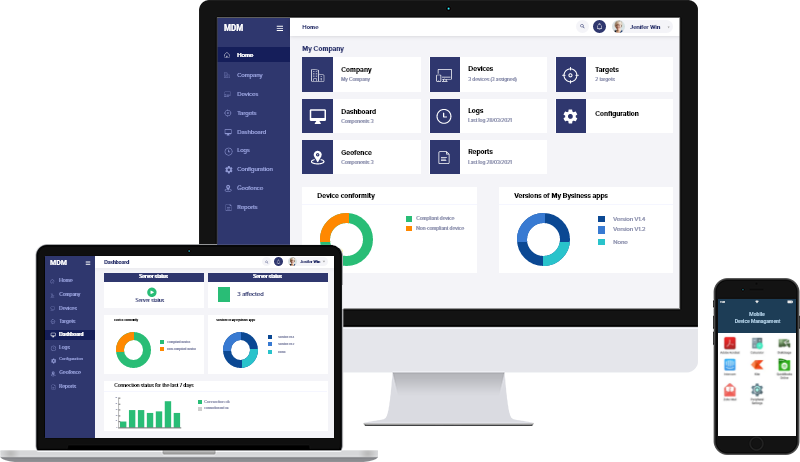
With modern MDM and UDM Solution, businesses can bring multiple device management operations together through a single management platform.
Let's explore how it works, what businesses can manage, and whether one dashboard can really simplify your entire device ecosystem.
Why Is Managing Multiple Business Devices Becoming So Difficult?
Businesses no longer depend on just desktop computers and company smartphones. Their daily operations involve a wide range of connected devices, including:
-
Android smartphones and tablets
-
iPhones and iPads
-
Windows and macOS laptops
-
Rugged handheld devices
-
Point-of-sale (POS) terminals
-
Digital signage displays
-
Self-service kiosks
-
Dedicated IoT endpoints
The problem isn't simply the number of devices. It's the different ways they need to be managed.
For example, a retail company might use Android POS terminals in stores, Windows computers in corporate offices, and tablets for inventory management.
If every device type requires a separate management tool, IT administrators must switch between dashboards, repeat configurations, monitor different reports, and troubleshoot issues individually.
This creates unnecessary complexity, increases administrative workloads, and makes maintaining consistent security policies more difficult.
Can One Dashboard Really Manage All Your Company's Devices?
Yes, a unified device management platform can manage multiple types of business devices through a centralized dashboard, provided the operating systems and device configurations are supported.
Instead of switching between disconnected management systems, IT administrators can use one platform to monitor device status, manage applications, enforce security policies, and coordinate device operations.
This is where Unified Device Management Solution becomes valuable.
A modern UDM solution brings device inventory, policy management, application control, security monitoring, and operational workflows into one management environment.
For growing organizations, this means better visibility, fewer disconnected processes, and more consistent device administration.
7 Ways a Centralized Dashboard Makes Device Management Easier
1. Monitor Every Device From One Place
Imagine receiving a notification that several company devices have gone offline across different locations.
Without centralized monitoring, your IT team may need to check multiple systems to identify the affected devices.
A centralized device management dashboard provides a consolidated view of your managed fleet.
Depending on platform capabilities, administrators can monitor:
-
Online and offline device status
-
Device ownership and assigned users
-
Operating system versions
-
Application inventory
-
Device groups and locations
-
Compliance and policy status
This visibility helps IT teams identify potential problems earlier and prioritize troubleshooting.
2. Manage Multiple Operating Systems Together
Most organizations operate in mixed-device environments.
Some employees use Android smartphones, others use iPhones, while office teams depend on Windows or macOS computers.
Managing these devices separately can create inconsistent administrative processes.
A cross-platform device management solution helps organizations manage supported operating systems through a unified control environment.
For example, EasyControl UDM supports management across Android, AOSP, iOS, iPadOS, macOS, Windows, Linux, and dedicated devices.
This allows IT teams to coordinate device operations without relying on completely separate management workflows for every platform.
3. Apply Security Policies Across Your Device Fleet
One unmanaged device can become a potential security weakness.
Businesses need consistent security requirements to protect company information, applications, and internal resources.
A centralized dashboard helps administrators define and enforce policies across supported device groups.
These policies may include:
-
Password and screen-lock requirements
-
Application restrictions
-
Network and Wi-Fi configurations
-
Device usage restrictions
-
Security and compliance rules
-
Access permissions
For example, a company can establish different device policies for office employees, warehouse workers, and retail staff.
This makes security administration more organized while allowing policies to reflect different operational requirements.
4. Distribute and Update Business Applications Remotely
Application management becomes increasingly difficult when hundreds of devices depend on the same business software.
Imagine deploying a new inventory application across 300 warehouse tablets. Manually installing the application on every device would consume considerable time.
With centralized application lifecycle management, IT administrators can distribute, update, manage, and remove business applications remotely on supported devices.
This helps organizations:
-
Deploy applications to selected device groups.
-
Maintain consistent application versions.
-
Update business-critical software.
-
Remove outdated or unnecessary applications.
-
Restrict unauthorized applications.
The result is a more organized application environment with fewer manual installation tasks.
5. Control Kiosk, POS, and Dedicated Devices
Not every business device is designed for general-purpose use.
Retail stores, restaurants, hospitals, and transportation companies frequently use dedicated devices for specific tasks.
For example:
-
POS terminals process customer transactions.
-
Self-service kiosks handle customer orders.
-
Tablets display product catalogs.
-
Digital signage screens show promotional content.
-
Rugged handheld devices support warehouse operations.
Using kiosk device management software, businesses can restrict devices to approved applications and specific workflows.
IT teams can configure kiosk modes, manage permitted applications, and maintain device settings remotely, depending on device compatibility.
This helps reduce unauthorized usage and keeps business-critical devices focused on their intended purpose.
6. Reduce Troubleshooting Time With Remote Device Management
When a device stops working at a remote location, sending a technician to investigate isn't always practical.
Remote device management allows IT administrators to perform supported actions without physically accessing every endpoint.
These actions may include:
-
Restarting devices remotely.
-
Updating device configurations.
-
Managing applications.
-
Checking device status.
-
Applying policy changes.
-
Performing supported remote troubleshooting actions.
For businesses operating across multiple cities or countries, these capabilities can reduce unnecessary site visits and help restore normal operations faster.
7. Improve Compliance and Reporting
Managing devices isn't just about keeping them operational. Businesses must also understand whether their devices follow established security and operational requirements.
A unified dashboard can help IT teams review compliance status, identify policy deviations, maintain activity records, and generate reports.
For example, administrators can identify devices that haven't received required configurations or applications that are not aligned with approved deployment policies.
This creates better operational visibility and helps organizations maintain more consistent device governance.
MDM vs. UDM: Which Is Better for Managing Multiple Devices?
Both MDM and UDM help organizations simplify device administration, but their management scope differs.
| Feature | Traditional MDM | Unified Device Management |
|---|---|---|
| Device management | Primarily mobile devices | Multiple supported endpoint types |
| Device enrollment | Yes | Yes |
| Application management | Yes | Yes |
| Security policies | Mobile-focused | Broader policy governance |
| Cross-platform management | Depends on solution | Designed for mixed environments |
| Compliance visibility | Device-focused | Broader enterprise visibility |
| Enterprise operations | Mobile fleet management | Unified device operations |
If your organization primarily manages Android and iOS devices, an MDM solution may be sufficient.
However, if you need to coordinate multiple operating systems, applications, policies, and compliance requirements, UDM offers a broader management approach.
How EasyControl Helps Businesses Manage Devices From One Dashboard
EasyControl provides centralized device management through its MDM and UDM solutions.
EasyControl MDM helps IT teams manage Android and iOS devices with capabilities such as device enrollment, policy enforcement, application distribution, kiosk management, and remote support.
EasyControl UDM takes a broader approach by bringing device management, application governance, policy enforcement, compliance visibility, and operational workflows together.
Businesses can use EasyControl to:
-
Manage supported devices through a unified management console.
-
Monitor device status and operational health.
-
Apply security policies across device groups.
-
Manage application deployment and updates.
-
Control dedicated and kiosk devices.
-
Improve compliance visibility.
-
Support cloud, on-premises, and hybrid deployment models.
Whether an organization operates retail POS terminals, corporate smartphones, warehouse tablets, or distributed enterprise endpoints, centralized management can make everyday IT operations more structured and manageable.
Explore EasyControl UDM and EasyControl MDM to understand which solution fits your device management requirements.
Final Thoughts
Managing company devices shouldn't require IT administrators to jump between multiple dashboards and disconnected management systems.
As businesses grow, centralized device management becomes increasingly important for maintaining visibility, enforcing security policies, managing applications, and supporting distributed operations.
A unified dashboard won't eliminate every device-specific limitation, but it can significantly simplify how organizations manage their supported endpoints.
The real advantage isn't just having all your devices in one place. It's being able to see what's happening, understand what needs attention, and take action from a centralized management environment.
That's the direction modern enterprise device management is moving toward.
Frequently Asked Questions (FAQs)
1. Can one dashboard manage Android, iOS, and Windows devices?
Yes. Modern unified device management platforms can manage supported Android, iOS, Windows, and other operating systems through a centralized console. Available features may vary by platform.
2. What is a centralized device management dashboard?
It is a management interface that allows IT administrators to monitor devices, configure policies, distribute applications, review compliance, and perform supported remote actions from one location.
3. Is MDM enough for managing all company devices?
MDM is suitable for managing mobile devices such as smartphones and tablets. Organizations with broader cross-platform management requirements may benefit from Unified Device Management (UDM).
4. Can IT administrators manage devices across multiple locations?
Yes. Cloud-based and other centrally managed device management deployments can help IT administrators monitor and manage supported devices across geographically distributed locations.
5. Can businesses remotely install and update applications?
Yes. Device management platforms support remote application distribution, installation, updating, and removal on compatible managed devices.
6. What should businesses look for in a unified device management solution?
Look for cross-platform support, centralized monitoring, security policy enforcement, application lifecycle management, remote operations, compliance reporting, scalability, and flexible deployment options.